
AppCider / In-app purchase price tracker
In-app purchase price tracker for competitor apps
An in-app purchase price tracker shows what other apps charge for their in-app purchases in each country and tells you when a price changes. AppCider does this for the competitors you follow: on the App Store it records the in-app purchases each storefront lists, with price and ≈ USD, and on Google Play it records the price range per country.
Every change is kept with the price before and after, so you see when a competitor moved a price and where.
What AppCider records
You add a competitor by name or store link. AppCider then reads its store pages and keeps the in-app purchase prices it finds. It checks 175 App Store storefronts and 144 Google Play countries to see where an app is sold.
App Store: the list, per storefront
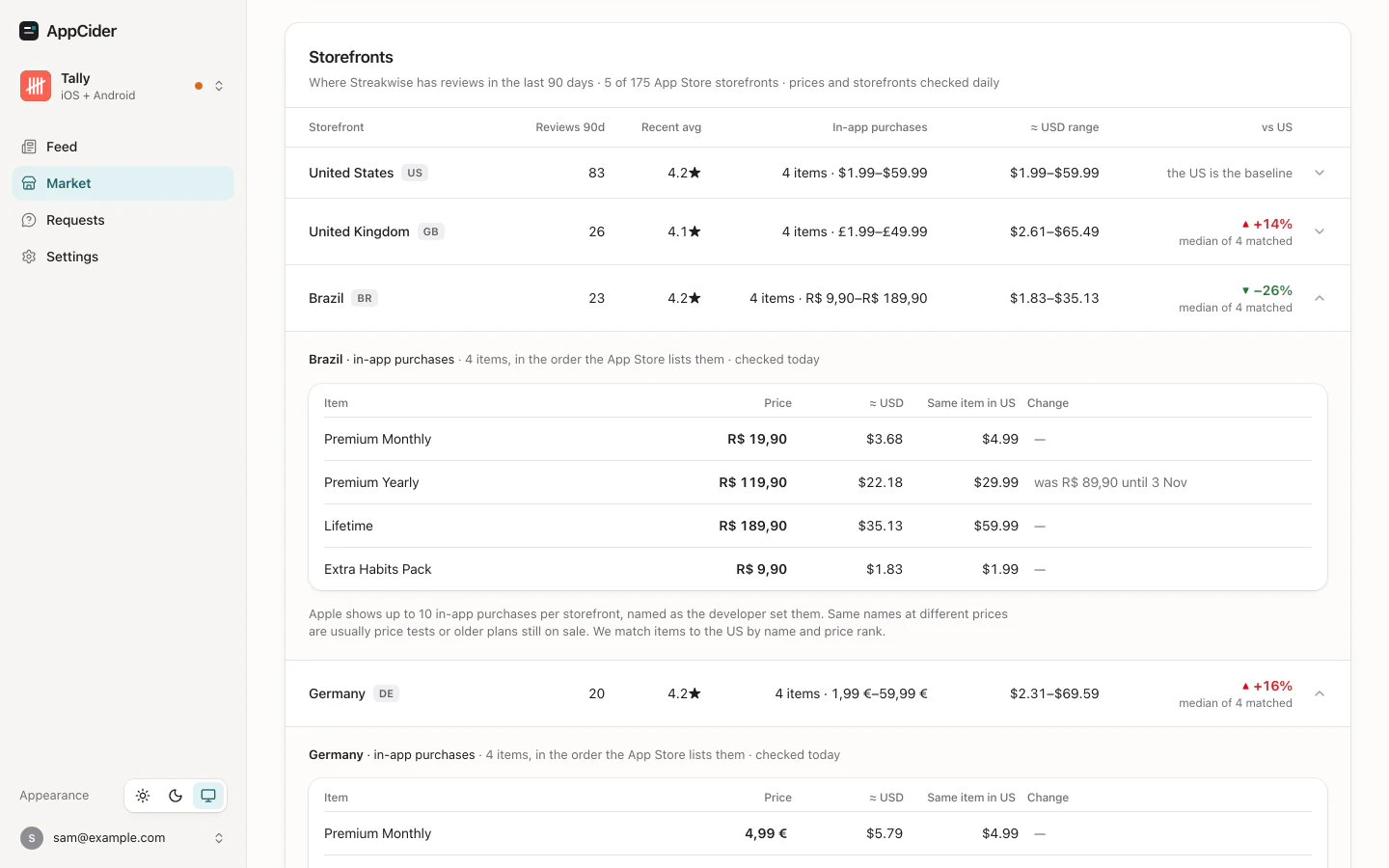
For each storefront where the competitor sells the app and has ratings, AppCider keeps the in-app purchases as that storefront lists them, in the same order. Each item has the price as the storefront prints it, the price in ≈ USD, and the same item in the US with the difference in percent.
Apple's product page shows at most 10 in-app purchases per storefront and rotates which ones. When a storefront lists exactly 10, AppCider reports a change only when it is sure it is the same item, so every change you see is a real one.
Google Play: the price range per country
Google Play's app page shows one line for in-app purchases, such as "$0.99 - $49.99 per item". That is the cheapest and the most expensive item, not the list. AppCider reads that line in each country daily and keeps the low and the high with ≈ USD. A change is a move of the range.
Change history
The first read of a competitor's prices is a baseline and is not reported as a change. After that, each price change is stored with the price before and after, and its ≈ USD at the exchange rate of the day it happened.
The Market page in the app shows the newest change of each item. Through MCP, your AI agent can read every change AppCider has recorded for that competitor, from up to 90 days before you added it and within the last 12 months. From the day you add it, every change is kept.
Price changes in your Feed and in alerts
When a competitor's price goes up or down in any storefront, it appears in your Feed that day. One competitor's price changes in one store on one day are one Feed item, so a rise in Brazil, Germany and Japan on the same day is a single item with a row for each storefront. The home page has the short version under what to charge.
You can get an instant alert by email for a competitor's price change. Alerts are kept to three a day across all types, and you can switch them off per app. The daily brief arrives by email at 8:00 or the time you pick.
In the example, Streakwise is a made-up competitor. Its Premium Yearly price rose in all three storefronts on the same day, and each row shows the old and the new price with ≈ USD.
Check App Store prices by hand
A spot check costs nothing and works on the App Store. It gets slow quickly.
- Open the competitor's App Store page in a browser. The address looks like
apps.apple.com/us/app/name/id123456789. The two letters after apps.apple.com are the storefront code. - Change that code to another country's code, such as
defor Germany,brfor Brazil orjpfor Japan, and load the page. AppCider reads the same address form, apps.apple.com/{code}/app/id{id}. - Scroll to the In-App Purchases list and write down each item and its price.
- Repeat for each country, then convert the prices to one currency to compare them.
A list of 10 may not be the whole list, because the storefront rotates its items. Keep your notes: a price you did not write down last time cannot be compared. Doing one competitor in every storefront by hand is up to 175 page loads for a single check.
Tools compared on competitor in-app purchase prices
| Tool | Competitor in-app purchase prices | Source |
|---|---|---|
| AppCider | App Store: the in-app purchases each storefront lists, up to 10, with price, ≈ USD and the US equivalent. Google Play: the price range per country. Change history and email alerts. | AppCider home page |
| Adapty Price Radar | A free, one-off benchmark of your own pricing and conversion against similar apps by country, across 60+ countries, starting from an App Store link. It compares with similar apps, not with named competitors over time. The page doesn't mention alerts. | adapty.io/price-radar |
| App Pricing Lab | A free public list of in-app purchase price changes on the App Store and Google Play, updated daily. The page doesn't say how apps are chosen or whether prices are per country, and it mentions no alerts. | apppricinglab.com/iap |
| Apptica | A 2020 post describes in-app purchase prices by country, in 30+ countries, in USD and local currency, for apps in general. It doesn't give a price. | apptica.com blog, 2020 |
| AppFollow | — | appfollow.io |
| Appbot | — | appbot.co/pricing |
| Appfigures | — | appfigures.com/pricing |
| AppTweak | — | apptweak.com/en/pricing |
Checked on 13 November 2026 on each vendor's own page. "Doesn't mention" means we did not find it on the page we read. The vendor may offer it elsewhere. A dash means the vendor's own pages don't list it.
Price Radar suits you better if you want a one-time look at how your own pricing compares with similar apps. AppCider suits you better if you want named competitors' prices in each storefront, read again and again, with a message when one changes.
Read the same prices with your AI agent
Your agent can read the prices and the change history through the get_prices tool of AppCider's MCP server, filtered by store, storefront code and date. Every price comes with the exchange rate it was converted at. Ask it which competitors changed an in-app purchase price in the last 30 days, and in which countries.
Questions
Can I see a competitor's in-app purchase prices in every country?
On the App Store, yes for every storefront where the competitor sells the app and has ratings: AppCider keeps each in-app purchase the storefront lists, up to 10 per storefront, with its price and ≈ USD. On Google Play you get the cheapest and the most expensive price per country, because Play shows a range and not the list.
Does it track price changes over time?
Yes. The first read of a competitor is a baseline. After that every change is stored with the price before and after and its ≈ USD at that day's exchange rate. A change appears in your Feed and, if alerts are on, in an email alert.
Do I need access to App Store Connect or Play Console?
No. AppCider reads public store pages, so you can follow any competitor without connecting an account.
Can my AI agent read the prices?
Yes. The get_prices tool in AppCider's MCP server returns the prices and the change history. MCP is on every plan.
How much does it cost?
Solo is $39 a month for 1 app and 6 competitors or keywords. Every account starts with a 14-day trial on Solo: add a card at signup and cancel before it ends to pay nothing. There is no free plan.
Watch your competitors' prices free for 14 days
Add a competitor and see its in-app purchase prices in the storefronts it sells in.
Start free trial 14 days free on Solo, then $39 a month. Add a card at signup; cancel before the trial ends and you pay nothing.