
AppCider / Guides / Feature requests
How to find feature requests in competitor app reviews
Pick three to five competitors, read their recent low and mid-star reviews in both stores, and tag each ask with a short theme. Count the asks per theme and per app, keep one quote for each theme, and check again every month. AppCider does the same reading and counting every day for the competitors you follow.
Find feature requests by hand
- Pick three to five competitors. Choose apps your users could pick instead of yours. Include the Android and the iOS version of each one if it has both, so you read both stores.
- Read their recent reviews. Start with the low and mid-star reviews from the last month. Add the high-star reviews later, because some of them ask for things too.
- Tag each ask with a short theme. Use plain names, like "Apple Watch app" or "Export to CSV". Reuse a theme you already have before you make a new one, so the counts stay comparable.
- Count the asks. Keep one count per theme and one per app. A sheet with a row per ask is enough: theme, app, store, date. If one review asks for two things, give it two rows.
- Keep one quote for each theme. Note the app, the store and the date next to it. The quote is what you show when you decide.
- Check again every month. Use the same competitors, so this month's counts can sit next to last month's.
An example of the tally
The numbers below are made up. They come from AppCider's demo account, where a habit tracker called Tally follows three competitors: Loopday, Streakwise and Kinhabit.
| Theme | Asks |
|---|---|
| Widgets for the home screen | 38 |
| Apple Watch app | 21 |
| Export to CSV | 12 |
| Bring back streak freezes | 9 |
Made-up example data from AppCider's demo account. No real app's reviews.
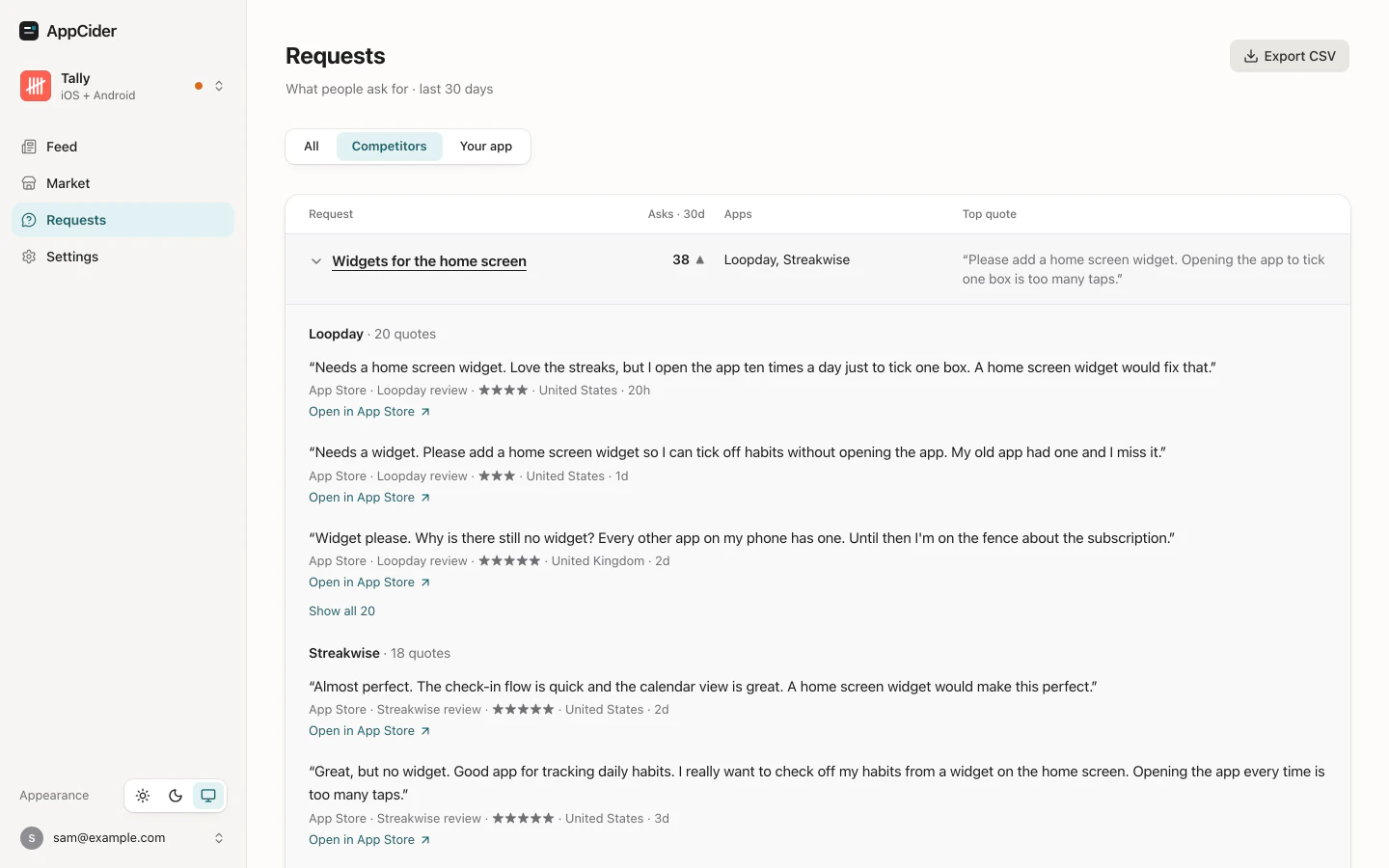
The widget asks were about Loopday and Streakwise. The nine asks for streak freezes were about Kinhabit, whose update removed them. A theme asked of two competitors is a different signal from a theme asked of one. The counts say how often people ask, which makes them one input to what you build.
When the by-hand method gets heavy
It works for a first look. It gets heavy when you repeat it each month for several competitors across two stores, because every ask has to be read, tagged and counted again. Counts also drift when you name the same ask two ways in two months.
How AppCider's Requests works
AppCider reads the public reviews of the competitors you follow, on the App Store and Google Play. It scores each review. A review counts as an ask when AppCider scores it as a request and as specific. Asks are then put under themes, such as "Widgets for the home screen". A new ask joins a theme a few minutes after it is found.
A theme holds its name, the number of asks in the window, and the apps they were asked of: your app and each competitor. It also shows your other apps that have a theme with the same name. Open a theme and you get its quotes, newest first, each with the source, a link, the date and the text. The default window is the last 30 days, and the Requests page lets you switch between all asks, your app's asks and the competitors' asks.
Requests also counts asks it finds in public posts, for example on Reddit. Your AI agent can read the same themes and quotes through the MCP server. On Solo you follow 1 app and 6 competitors or keywords, in any mix.
The idea behind Requests is on the home page, under what to build. For how requests sit next to the other things worth watching about competitors, see app competitor tracking.
Questions
How many competitors should I read?
Three to five keeps the by-hand method manageable. On Solo, AppCider follows 6 competitors or keywords in any mix.
Which reviews should I read first?
Start with the recent low and mid-star reviews, in both stores. Add the high-star reviews later, because some of them ask for things too.
Does a count of asks tell me what to build?
No. A count shows how often people ask for something. It doesn't show how many would pay for it, so use it as one input to your decision.
Can I see the reviews behind a theme in AppCider?
Yes. Each theme opens on its quotes. Each quote has its source, a link, its date and the text, and you can filter to your own app's asks or to the competitors' asks.
How recent are the counts in AppCider?
The default window is the last 30 days. A new ask joins its theme within a few minutes of AppCider finding it.
Is the screenshot real data?
No. It shows AppCider with made-up example apps.
See what your competitors' users ask for
Follow up to 6 competitors or keywords, and Requests counts the asks for you.
Start free trial 14 days free on Solo, then $39 a month. Add a card at signup; cancel before the trial ends and you pay nothing.